
Document Processing Automation
Turn Documents Into Structured Business Workflows
Automatically classify, extract, validate and route information from invoices, contracts, forms, PDFs and email attachments.
Extraction is the easy half. The value is in what happens next — validation, exceptions, and the downstream system actually being updated.
- Fixed scope
- Measurable ROI
- Human-in-the-loop
- Works with your existing stack
Trusted on complex technology delivery
Does any of this look familiar?
These are the symptoms we see before the numbers get measured.
- Documents arrive by email and someone opens every one
- Key values are typed from a PDF into a system by hand
- Contracts and forms are reviewed manually for the same handful of fields
- Incomplete submissions are discovered late, after the work is done
- The same document is filed in two places, inconsistently
What this process costs you today
Before anyone talks about technology, it is worth knowing the number you are trying to beat.
A worked example
Modelled estimate3 employees × 10 hours/week of repetitive processing = 1,560 hours/year.
At $40/hour loaded cost
$62,400
annual process cost
If automation removes
70%
of the manual effort
Recoverable capacity
$43,680
per year
Three people handling inbound documents, before counting downstream rework from bad data.
Now run it on your own volumes
Your current process
Assumptions
- Fully loaded hourly cost of staff handling documents manually
- Rework estimated at 1.5x the original handling time per error
- Automatable share of 65–80% based on document processing benchmarks
- Payback modelled against a typical single-process implementation investment
Your estimated opportunity
Modelled estimate- Current estimated annual cost
- $206,400≈ 3.1 FTE of manual effort
- Potential automatable effort
- 65–80%
- Indicative payback
- 2 months
- Potential annual opportunity
- $134,160 – $165,120
Directional planning estimate based on your inputs — not a quote or a substitute for finance sign-off.
How we work
- 1
Map
Sit with the people doing the work and document the process as it actually runs — including the workarounds nobody wrote down.
- 2
Measure
Establish a baseline: volume, handling time, error and rework rate, and what the process costs you today.
- 3
Build
Redesign the workflow and build it against your real systems and data — not a mockup or a slide.
- 4
Validate
Test against edge cases, confirm exception handling and approval gates, and measure the result against the baseline.
- 5
Deploy
Move into production with monitoring, runbooks and training — or recommend against it if the numbers do not hold up.
Before and after
Today
- Attachment opened and read
- Relevant pages located by hand
- Fields transcribed into a system
- Checked against another source
- Filed manually; issues found later
After
- Document classified on arrival
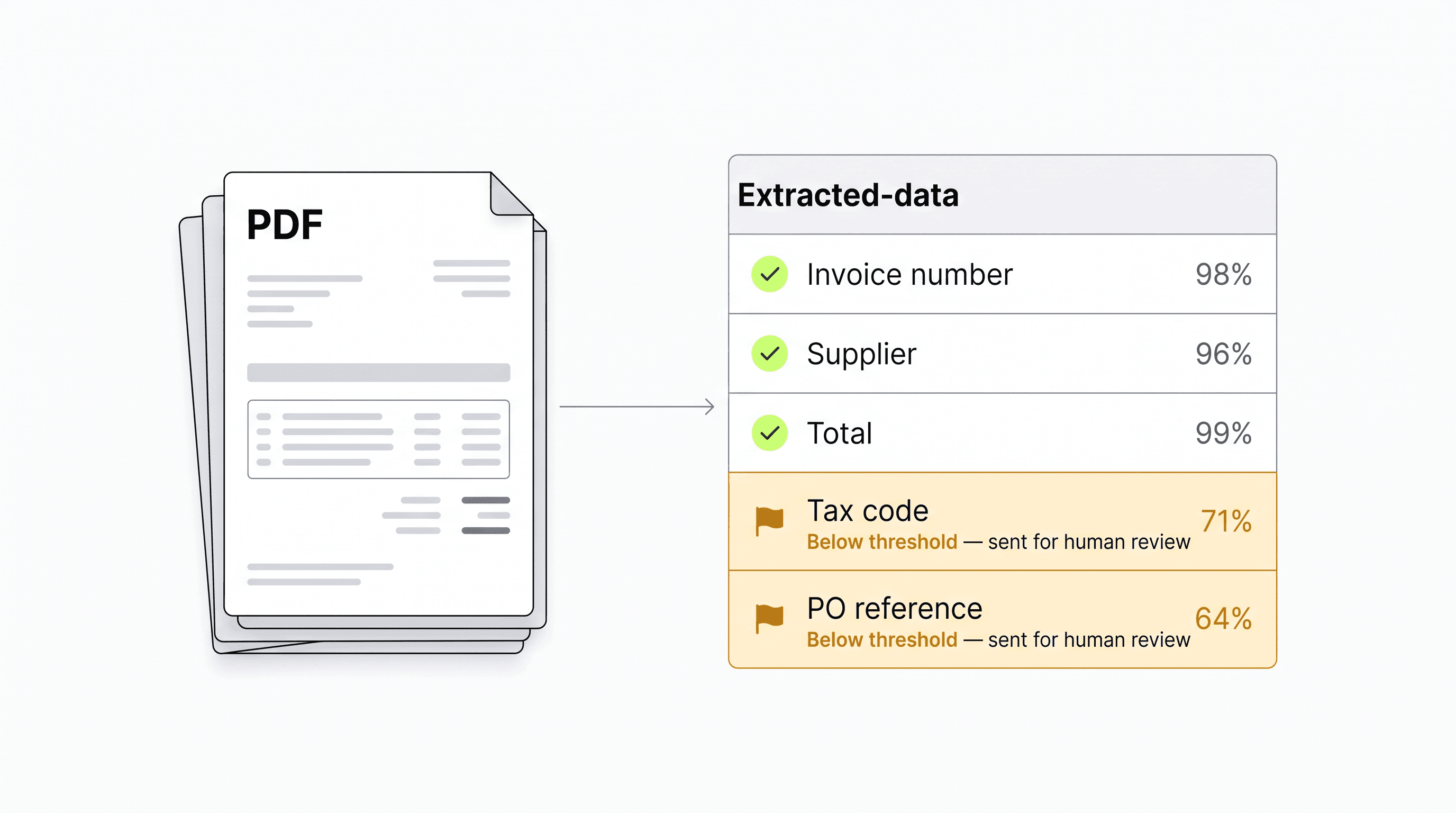
- Fields extracted with confidence scores
- Validated against your systems of record
- Low-confidence or out-of-policy items queued for review
- Downstream system updated and the document filed
What we automate
- Invoices and remittances
- Contracts and agreements
- Application and intake forms
- Identity and compliance documents
- Claims packs
- Statements and reports
- Email attachments at volume
What you receive
The discovery call scopes your needs. Before paid work starts, your proposal confirms the deliverables, acceptance criteria, fee and any ongoing software or support costs. The call does not commit you to a project.
- Document taxonomy and classification model
- Extraction schema for the fields you actually use
- Validation rules against your systems of record
- Confidence thresholds and human review queue
- Downstream system integration
- Accuracy measured on your real documents
- Audit trail from arrival to completed action
A result we measured
EOI processing fell from 40 minutes to under 4 minutes a case
An insurance carrier was handling evidence-of-insurability submissions by hand across 12 locations. We started with three regional offices — about 15% of volume — before extending to the rest.
- Before
- 40 min per case
- After
- Under 4 min
- Change
- 90% touchless
“Claims cycle time went from 45 days to 18. The part that surprised us was how much of it was document handling rather than decision-making.”
Insurance carrier · Claims operations · Impact study
Read the full impact studyWhat the numbers say
Every figure is labelled by where it comes from — measured customer results, industry benchmarks, modelled estimates, or commitments we make to you.
Evidence
70%
Faster document review
75%
Reduction in onboarding time
65–80%
Of document handling typically automatable
Industry benchmarks are drawn from published automation research and our own delivery baselines. We will share the specific source and assumptions behind any figure here on request — and during the Assessment we replace them with measurements from your own process.
What we commit to
Confidence
Gated — low-confidence output goes to a person
Technology we build on
We are not tied to one platform. The right tool depends on the workflow, your existing stack, and what you can maintain.
How we keep it safe
Human approval gates
You decide which decisions an automation may make alone and which require a person. Thresholds are configured to your policy.
Exception handling
Anything ambiguous, incomplete or out of policy routes to a named owner with the reason attached — it does not fail silently.
Audit trail
Every action is logged: what ran, on what input, what it decided, and who approved it. Built for audit and incident review.
Least-privilege access
Automations connect through credentialed, scoped integrations you grant and can revoke. Your systems stay the system of record.
How engagements run
Each stage is a decision point. You only continue if the previous stage justified it.
Process Assessment
Map one process, quantify what it costs today, and get a fixed implementation recommendation.
Fixed fee, credited against a SprintStage 2Automation Sprint
Redesign and build the workflow, then prove whether the economics justify scaling it.
Fixed scope, fixed feeStage 3Production Implementation
Harden a validated workflow for real users, real data, security, monitoring and scale.
Scoped from the Sprint findingsStage 4Managed Automation
Keep automations reliable as systems, rules and volumes change.
Monthly retainerFAQ
Document Processing FAQs
It depends on document type and quality, which is why we measure it on your own documents before anything goes live. Every field carries a confidence score, and anything below your threshold goes to a person instead of into your systems.
Those output data and stop. This completes the workflow: validation against your systems of record, business rules, exception routing, and the downstream action in your CRM, ERP, HRIS or ticketing system.
Invoices, contracts, forms, identity documents, certificates, statements and general correspondence — typed, scanned or photographed. If your team can read it, it can usually be classified and extracted.
Next step
Automate a document workflow
Pick your highest-volume document process. We measure what it costs today and what automating it would return.