
Finance Automation
Automate Repetitive Finance Operations
Reduce manual invoice processing, reconciliation, reporting and approval work — without replacing the systems your finance team already trusts.
Measured in cost per transaction, hours per month, days to close and exception rate. Not in models deployed.
- Fixed scope
- Measurable ROI
- Human-in-the-loop
- Works with your existing stack
Trusted on complex technology delivery
Does any of this look familiar?
These are the symptoms we see before the numbers get measured.
- Invoices are re-keyed from a shared mailbox into the ERP
- Reconciliation happens in a spreadsheet nobody else can run
- Month-end close depends on one person's undocumented routine
- Approvals sit in email until somebody chases them
- The management pack is assembled by hand from several sources
- Nobody can state the cost per invoice processed
What this process costs you today
Before anyone talks about technology, it is worth knowing the number you are trying to beat.
A worked example
Modelled estimate3 employees × 9 hours/week of repetitive processing = 1,404 hours/year.
At $45/hour loaded cost
$63,180
annual process cost
If automation removes
65%
of the manual effort
Recoverable capacity
$41,067
per year
A three-person AP function, before counting the cost of late payments or duplicate invoices.
Now run it on your own volumes
Your current process
Assumptions
- Fully loaded hourly cost of AP staff handling invoices
- Error rework estimated at 1.5x the original handling time per failed invoice
- Automatable share of 62–75% based on AP automation industry benchmarks
- Payback modelled against a typical single-process implementation investment
Your estimated opportunity
Modelled estimate- Current estimated annual cost
- $190,800≈ 2.6 FTE of manual effort
- Potential automatable effort
- 62–75%
- Indicative payback
- 2 months
- Potential annual opportunity
- $118,296 – $143,100
Directional planning estimate based on your inputs — not a quote or a substitute for finance sign-off.
How we work
- 1
Map
Sit with the people doing the work and document the process as it actually runs — including the workarounds nobody wrote down.
- 2
Measure
Establish a baseline: volume, handling time, error and rework rate, and what the process costs you today.
- 3
Build
Redesign the workflow and build it against your real systems and data — not a mockup or a slide.
- 4
Validate
Test against edge cases, confirm exception handling and approval gates, and measure the result against the baseline.
- 5
Deploy
Move into production with monitoring, runbooks and training — or recommend against it if the numbers do not hold up.
Before and after
Today
- Invoice lands in a shared mailbox
- Downloaded and read
- Values typed into the ERP
- Emailed for approval
- Chased until paid
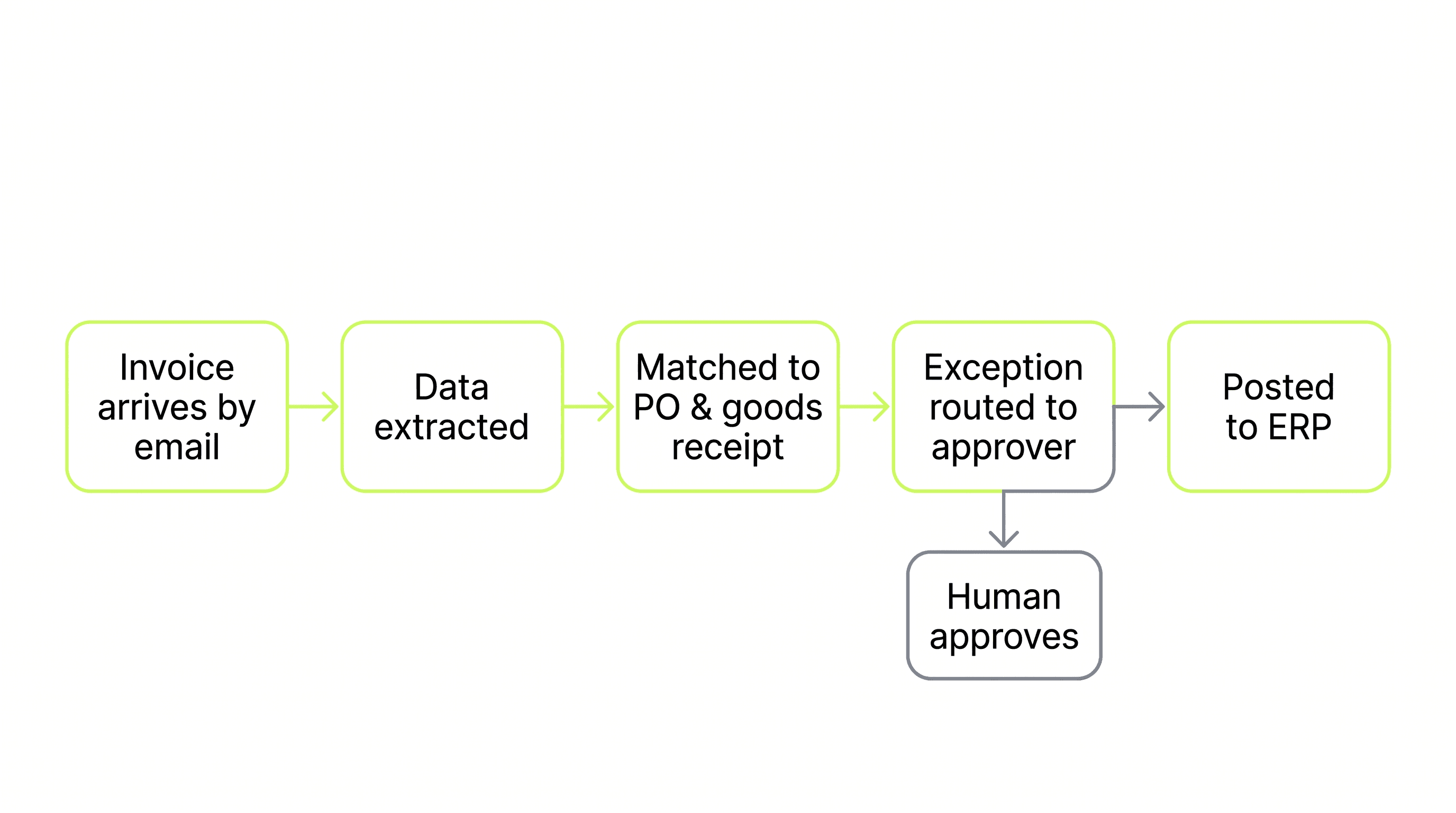
After
- Captured on arrival
- Extracted and supplier-validated
- Matched to PO and goods receipt
- Coded and routed to the approver
- Posted to the ERP on approval
Today
- Export from two systems
- Match line by line in Excel
- Investigate every difference
- Re-run when data changes
After
- Sources pulled automatically
- Matched on your rules and tolerances
- Only genuine exceptions surface
- Reviewer sees the reason, not the raw data
Today
- Chase colleagues for inputs
- Run checks manually
- Assemble the workbook by hand
After
- Inputs gathered and validated automatically
- Checks run and flagged
- Pack assembled and ready for review
What we automate
- Accounts payable and invoice processing
- Two- and three-way matching
- Bank and ledger reconciliation
- Month-end close preparation
- Management reporting packs
- Expense processing
- Supplier onboarding and master data
What you receive
The discovery call scopes your needs. Before paid work starts, your proposal confirms the deliverables, acceptance criteria, fee and any ongoing software or support costs. The call does not commit you to a project.
- Process map for the target finance workflow
- Baseline: cost per transaction, hours per month, exception rate
- Working automation against your ERP
- Tolerance rules and segregation-of-duties-aware approvals
- Exception routing with full context for reviewers
- Audit trail suitable for finance controls
- Measured before-and-after against the baseline
What the numbers say
Every figure is labelled by where it comes from — measured customer results, industry benchmarks, modelled estimates, or commitments we make to you.
Evidence
80%
Faster invoice cycle time
95%
Fewer reconciliation errors
62–75%
Of manual AP effort automatable
Industry benchmarks are drawn from published automation research and our own delivery baselines. We will share the specific source and assumptions behind any figure here on request — and during the Assessment we replace them with measurements from your own process.
What we commit to
Audit
Trail on every automated action
Technology we build on
We are not tied to one platform. The right tool depends on the workflow, your existing stack, and what you can maintain.
How we keep it safe
Human approval gates
You decide which decisions an automation may make alone and which require a person. Thresholds are configured to your policy.
Exception handling
Anything ambiguous, incomplete or out of policy routes to a named owner with the reason attached — it does not fail silently.
Audit trail
Every action is logged: what ran, on what input, what it decided, and who approved it. Built for audit and incident review.
Least-privilege access
Automations connect through credentialed, scoped integrations you grant and can revoke. Your systems stay the system of record.
How engagements run
Each stage is a decision point. You only continue if the previous stage justified it.
Process Assessment
Map one process, quantify what it costs today, and get a fixed implementation recommendation.
Fixed fee, credited against a SprintStage 2Automation Sprint
Redesign and build the workflow, then prove whether the economics justify scaling it.
Fixed scope, fixed feeStage 3Production Implementation
Harden a validated workflow for real users, real data, security, monitoring and scale.
Scoped from the Sprint findingsStage 4Managed Automation
Keep automations reliable as systems, rules and volumes change.
Monthly retainerFAQ
Finance Automation FAQs
No. We connect to NetSuite, Dynamics 365, QuickBooks, SAP, Xero, Sage Intacct and others. Your ERP remains the system of record — the automation does the work between systems.
OCR reads characters and leaves validation, matching, coding and exception handling to your team. This completes the workflow, so the output is a posted transaction rather than a text file.
Supplier bank-detail changes are always flagged for human review, approval thresholds follow your policy, segregation of duties is respected, and every action is logged for audit.
Cost per transaction, hours per month, days to close, exception rate and processing time — measured before we start and again afterwards.
Next step
Assess a finance workflow
Pick the finance process that costs you most. We map it, measure it, and tell you what automating it is worth.